Tag Archives: PC Repair New City NY

Data Recovery Services

Posted On November 21, 2014 | Category:

Data Recovery Services
Data Recovery Services in Rockland CountyIt can be quite a catastrophe when your computer crashes or your hard drive dies and you realize that you do not have a backup of your files. Unfortunately, in many cases people tend to neglect backing up their data and do not realize the risk that they are taking by doing so. In the event that you are faced with the inability to access your data, data recovery is your only potential solution. It is not recommended to attempt to recover data from your hard drive or device if you are inexperienced with doing so.

We take data recovery very seriously, as we understand that your personal, important files are involved and at risk of being lost. We offer data recovery services at a fraction of the cost of many other data recovery facilities.

Signs That You Might Need Data Recovery

  • Your computer (hard drive) is making strange noises, such as: clicking, beeping, clunking, scratching, etc.
  • Your computer is constantly freezing and/or getting the blue screen of death (BSOD) and you cannot access your files
  • You can see your files, but you cannot open them
  • You attempt to boot up your computer and you get a S.M.A.R.T. hard disk error
  • You attempt to boot up your computer and you get a general disk read error


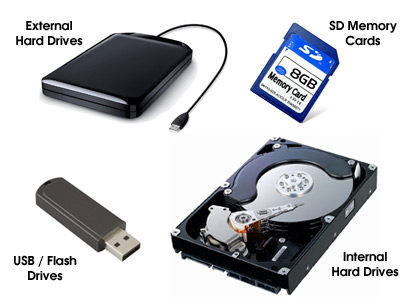
Types Of Storage We Can Recover Data From

• Internal Hard Drives
• External Hard Drives
• USB / Flash Drives
• SD Cards


FREE Pickup And Delivery

Our free pickup and delivery service is provided to all of our customers! Enjoy a hassle-free service experience as our technicians will pick up your computer from your location, deliver it after it is fixed, and set it back up for you. In some cases, we can provide on-site repairs, however this entirely depends on the servicing requirements of your computer. Call us today for a free estimate at (845) 228-8226.


contact

computer-services


We are proudly serving the computer repair, data recovery, virus removal and web design needs of all of Rockland County, New York, including Blauvelt, Congers, Garnerville, Haverstraw, Hillburn, Monsey, Nanuet, New City, Nyack, Orangeburg, Palisades, Pearl River, Piermont, Pomona, Sloatsburg, Sparkill, Spring Valley, Stony Point, Suffern, Tappan, Thiells, Valley Cottage, West Haverstraw, and West Nyack.

Read more
Wired and Wireless Network Setup

Posted On November 14, 2014 | Category:

Wired Network and Wireless Network Setup

WiFi Setup ServicesIn order for your computers and devices to be able to access the internet, it is important that you have a wireless or wired network setup for them to connect to the internet through. There are many ways to configure networks in your home or office.


Home networks (both wired and wireless) allow your computers and other devices to "talk" with each other so that users can connect to the internet and share files, software, printers, and various other devices.

Wired and wireless networks each have their pros and cons, so how do you decide what is best for your setup? Rockland County Computer Services to the rescue! Our expert technicians will come to your home or office and help you decide which type of network suits your needs and workspace the best.

Pros Of Wireless Networks

  • Ease of installation - Wireless networks allow your computers to connect to the internet without the need to use cables. This often can save time and a lot of work when compared to setting up a wired network.
  • Cost - The cost of a wireless network is often inexpensive due to the fact that you typically need only one device (a router,) to connect to the internet.
  • Mobility - With a wireless network, you are free to roam around your home or office. This can be a major advantage, as you are able to use the internet, print, and share files from any location within reach of your wireless network signal. This is often much more convenient than being in the same location permanently with a wired connection.

Pros Of Wired Networks

  • Speed - When your computer is plugged directly into a wired network, data transfer is significantly faster than when using a wireless network. Your internet is also guaranteed to not be affected by "dead spots" in your home or office in which a wireless connection might be.
  • Cost - The cost of a wired network is relatively inexpensive to initially install, and typically involves very little to no maintenance afterwards.
  • Stability - Wired networks are extremely stable. Once your home or office has been correctly wired for this type of network, there is no maintenance to be done regarding the wiring. Typically wired networks are more stable than wireless networks due to the fact that you do not have to rely on a wireless signal.
clear

Are you ready to have a wireless or wired network installed in your home or office? Call us today for a FREE estimate! (845) 228-8226.

contact
computer-services
clear

We are proudly serving the computer repair, data recovery, virus removal and web design needs of all of Rockland County, New York, including Blauvelt, Congers, Garnerville, Haverstraw, Hillburn, Monsey, Nanuet, New City, Nyack, Orangeburg, Palisades, Pearl River, Piermont, Pomona, Sloatsburg, Sparkill, Spring Valley, Stony Point, Suffern, Tappan, Thiells, Valley Cottage, West Haverstraw, and West Nyack.

Read more
Local and Cloud Data/File Backup Solutions

Posted On September 18, 2014 | Category:

Local and Cloud Data/File Backup Solutions

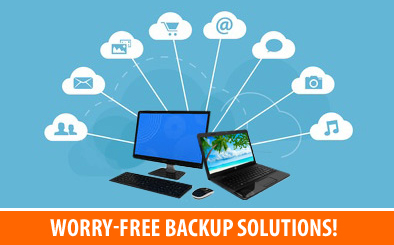
Local backup solutions and/or cloud based backup solutions are incredibly vital when you have important files on your computer. Even if you only have a handful of important files, it is incredibly important to have a backup solution so that you are not at risk of completely losing your data and having to deal with data recovery. If you value the documents, photos, music, videos, etc., on your computer, we highly suggest that you call us so that we can find a backup solution that best fits your needs.

Put yourself in this situation. You are using your computer and all of a sudden you get a random blue screen or error message and your computer shuts off. You decide to turn your computer back on, yet you soon come to realize that it will no longer boot and you cannot access the operating system or your files. You start to panic, knowing that you have important documents, family photos, your entire collection of music and so much more on your computer. Unfortunately, this is a fairly common issue for the high percentage of people that do not currently have a constant, automated backup of their computer.

Cloud Backup Solutions vs. Local Backup Solutions

Cloud Backup Advantages

  • Cost Effective - There is no backup hardware to purchase or maintain when using the cloud. You pay a monthly fee for software that handles everything
  • Lots Of Space - Some cloud backup solutions include unlimited space, and for those that do not, they are easily scalable if you need more space at any time
  • On-Site Catastrophe-Proof - In the event that there is a fire, flood or other unfortunate disaster at your home or office, your data will remain safely backed up on the cloud service's servers

Local Backup Advantages

  • Backup Speed - Backing up your data to a local storage device is much faster than backing up to cloud storage over the internet
  • Recovery Speed - In case your computer crashes and you need to recover your files, recovery is much faster from a local storage device. Downloading all of your files over the internet can take many hours, depending on how much data you have backed up
  • Security - Once your local storage device is unplugged, it is safe from hackers and any malicious attacks to your computer

Rockland County Computer Services is here to help you with all of your data backup needs. We can assist you in coming up with a backup solution fit your budget and computer configuration, therefore ensuring that data loss will not be an issue for you. Call us today at (845) 228-8226 and let us help find the perfect backup solution for you!

contact

computer-services


Read more
Computer Setup Services – Home and Office

Posted On September 11, 2014 | Category:

Computer Setup Services - Home and Office

You have purchased a new computer and now you need it set up. Nothing beats having your computer set up properly right out of the box. Rockland County Computer Services has the solution for you! We come to your home or office and set up your computer(s) the way that works best for you and your work environment. With our services, you can sit back and relax while we set up your computer(s) and connect them to all of your devices, including printers, scanners, mobile devices, etc.

Transferring The Data From Your Previous Computer

One of the most common services we provide along with our computer setup services is data transfer. There is a good chance that you will need some (or all) of the files that you had on your old computer. No problem! We can transfer the data from your old computer to your new one for you. We will make sure that your data ends up in the right place so you can enjoy peace of mind knowing that all of your original files are still accessible to you. Some of the most common items we transfer are the documents folder, pictures folder, music folder, downloads folder, Quickbooks file(s), Outlook (emails, contacts and calendar) or other email client files, browser favorites, etc. We are happy to assist you with determining what files should be transferred to your new computer. Once your files are transferred, we can also assist you with a local or cloud based backup service so that you will never have to worry about losing your files due to hardware failure, viruses, and various other issues!

Computer Setup Services That We Provide (And More!)

The following are some of the computer setup services we offer. Many additional services we provide to our customers may not be listed below. If a service you are in need of is not listed here, please contact us at (845) 228-8226.

  • Physically set up your desktop or laptop
  • Configure your computer to connect to your existing wired or wireless internet connection
  • Connect and configure peripheral devices (printers, external hard drives, scanners etc.)
  • Optimize your computer and remove unwanted/unnecessary trial software
  • Transfer your files/data to your new computer
  • Make sure that Windows is up to date
  • Set up and configure your email account(s)
  • Install/update any software that you need to use on your computer
  • Install and configure antivirus software

contact

computer-services


Read more
1 2 3 4 5 6 7 8 9